
4,000+ Themes in GB WhatsApp Pro v18.80
Pick from a built-in library of thousands of themes that completely transform your chat experience.
In context
Why people actually use 4,000+ Themes
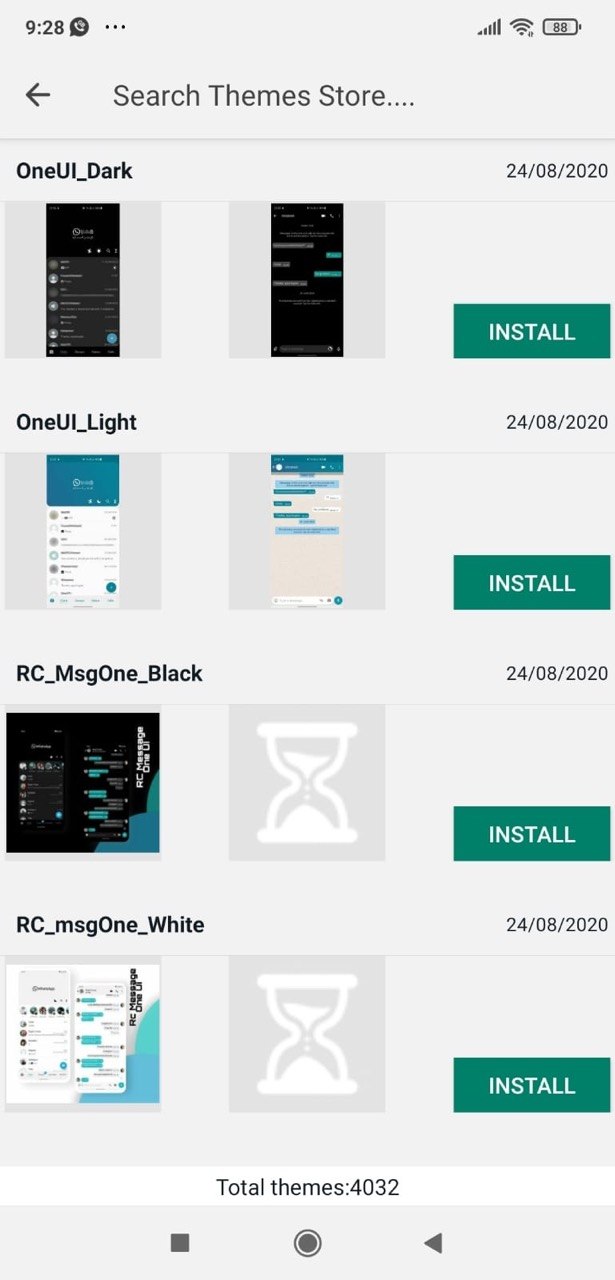
The 4,000+ theme library is the visual headline feature of GB WhatsApp Pro and the main reason the app feels different from official WhatsApp on first launch. A theme bundles a colour palette, header style, chat bubble style, navigation icons, and sometimes wallpaper into a single tap-to-apply package. Themes range from minimal dark variants to elaborate Instagram-inspired or messenger-style alternatives. You can browse the built-in store from inside the app, sorted by popularity and category — Material You, dark, gradient, holiday, anime, and so on. Themes apply instantly and can be switched back at any time with no setting loss. You can also save your current configuration as a custom theme and share the file with another GB WhatsApp Pro user. None of this is possible on official WhatsApp, where the only visual options are "system / light / dark".
Deep Dive
What 4,000+ Themes actually does
The GB WhatsApp Pro Theme Store ships with over 4,000 themes covering colour palettes, wallpapers, icon styles and bubble shapes. Themes are applied with a single tap and can be downloaded from inside the app without needing any external file. You can also create your own theme by mixing colours, fonts and tick styles, then export it for friends.
Key benefits
- 4,000+ pre-built themes
- Create and save your own theme
- Apply with one tap, revert anytime
How to enable
Enable 4,000+ Themes in 4 steps
Total time: about 30 seconds. Requires GB WhatsApp Pro v18.80 to be installed first. If you have not installed yet, download from the homepage.
-
Open the Theme Store
Three-dot menu → "Themes" (sometimes "GB Themes"). The store loads with featured packs at the top and category tabs underneath.
-
Preview before applying
Tap any theme to see large preview screenshots of the chat list, individual chat, and settings screens. Use the back arrow to return to the store.
-
Download and apply
Tap "Download" — the theme installs locally (~1–3 MB per theme), then "Apply". The whole UI changes immediately.
-
Save your favourites
Long-press an applied theme → "Save as favourite". Favourites appear in a separate tab for quick switching.
FAQ
Questions about 4,000+ Themes
Do themes change just colours or the entire interface?
Can I revert to the default look?
Do themes survive an app update?
Can I share themes with friends?
Common mistakes
What people get wrong with 4,000+ Themes
The most-asked support questions about 4,000+ Themes come from these three patterns. Worth scanning before you enable.
- 1
Installing a heavy theme on a 4 GB-RAM phone. Themes with elaborate animations or large wallpapers add 100–200 MB of memory load. If your phone is slow after a theme change, try a lighter one.
- 2
Forgetting which theme is applied. Many users layer themes and end up with a UI nobody can identify the source of. Use Theme Store → "Current theme" to check before troubleshooting.
More from Customisation
Related customisation features
Custom Fonts & Text Styles
Pick from 30+ fonts and use bold, italic, monospace and decorative styles in your messages.
Custom Tick Styles
Replace the default delivery and read ticks with hearts, stars, arrows and other shapes.
Custom Launcher Icons
Change the app icon on your home screen — disguise GB WhatsApp Pro as any other app.
Useful next
More on 4,000+ Themes and related topics
Hand-picked guides on how this feature interacts with installation, anti-ban routing, and the rest of GB WhatsApp Pro.
- How-to
Install GB WhatsApp Pro on Android
Safe sideload sequence — enable Unknown Sources, verify SHA-256 hash, first-launch checks.
Read - How-to
Update without losing chats
Safe in-place update procedure from any older build. Backup, install over, verify the upgrade kept your data.
Read - Blog
Anti-Ban Guide 2026
What "anti-ban" actually means at the routing-layer level, which user behaviours actually raise ban risk, and what to do if a ban hits.
Read
Get 4,000+ Themes (and 24 more features)
Install GB WhatsApp Pro v18.80 from gbwhattspro.com — every feature unlocked from first launch.