
In-App Lock in GB WhatsApp Pro v18.80
PIN, pattern or fingerprint lock built into the app — no third-party locker needed.
In context
Why people actually use In-App Lock
In-App Lock is a passcode, pattern, or fingerprint gate that opens before GB WhatsApp Pro shows your chat list — even after you have already unlocked your phone. The use case is privacy from people who share your device: a partner, a child, a colleague who borrows your phone for a moment. Official WhatsApp added biometric lock in 2021 but with two limitations GB WhatsApp Pro removes: official requires the OS-level biometric, so anyone who knows your phone PIN bypasses it; and official does not support pattern lock at all. GB WhatsApp Pro lets you set a passcode or pattern that is independent of the phone lock, so even someone with your phone PIN cannot open your messages without your separate WhatsApp lock. The fingerprint option is also available, and you can configure it per-chat — sensitive conversations get an extra lock layer while general chats stay open.
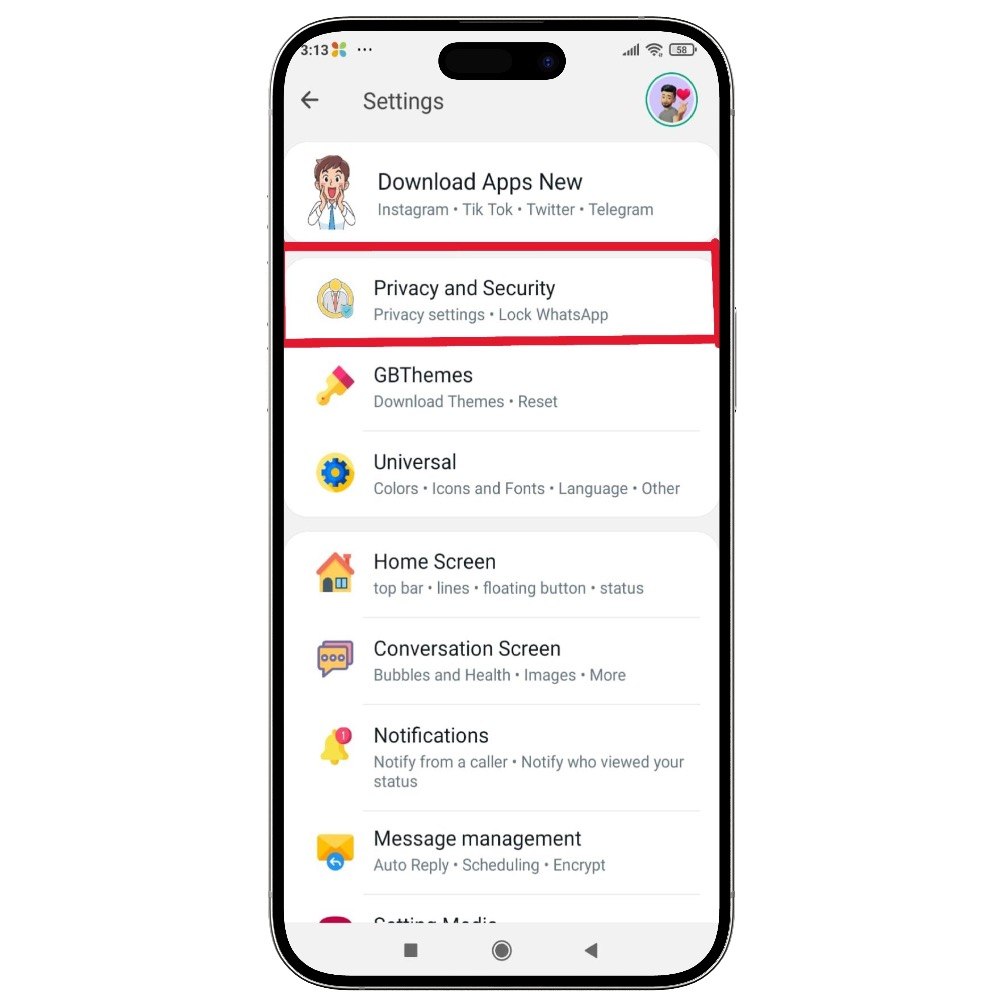
Deep Dive
What In-App Lock actually does
GB WhatsApp Pro has a built-in app lock that secures the entire app with a PIN, pattern or fingerprint. You can also lock individual chats so that even if someone has your unlocked phone, they cannot open your private conversations. No third-party locker app required, and the lock survives across app restarts.
Key benefits
- PIN, pattern and biometric lock options
- Lock individual chats separately from the app
- No external app required
How to enable
Enable In-App Lock in 4 steps
Total time: about 30 seconds. Requires GB WhatsApp Pro v18.80 to be installed first. If you have not installed yet, download from the homepage.
-
Open GB Settings → Privacy → Lock
Three-dot menu → GB Settings → Privacy → tap "Lock".
-
Pick a lock type
Choose Passcode, Pattern, or Fingerprint. Pattern works on any device; Fingerprint requires Android 6+ and a registered fingerprint.
-
Set your code and timeout
Enter the passcode / draw the pattern, then choose how soon after locking the device should re-prompt — immediately, after 1 minute, or after 30 minutes.
-
Optional: Lock specific chats only
Open any chat → three-dot menu → "Lock Chat". That chat now requires the lock to open, even from notifications.
FAQ
Questions about In-App Lock
What if I forget my GB WhatsApp Pro lock code?
Does the lock work for notifications too?
Can the lock be set per-chat?
Common mistakes
What people get wrong with In-App Lock
The most-asked support questions about In-App Lock come from these three patterns. Worth scanning before you enable.
- 1
Using the same lock pattern as the device unlock pattern. If someone watches you unlock your phone, they have the same code to enter GB WhatsApp Pro.
- 2
Forgetting to also hide notification preview. The lock keeps the chat list private, but a notification on the lock screen can still display the message content.
More from Privacy
Related privacy features
Ghost Mode
Become completely invisible — others see no online status, typing or recording indicators, and no read receipts.
Hide Online Status
Stay invisible while chatting — nobody sees the "online" badge under your name.
Freeze Last Seen
Freeze your last seen timestamp so others always see an old time, even when you are using the app.
Useful next
More on In-App Lock and related topics
Hand-picked guides on how this feature interacts with installation, anti-ban routing, and the rest of GB WhatsApp Pro.
- How-to
Install GB WhatsApp Pro on Android
Safe sideload sequence — enable Unknown Sources, verify SHA-256 hash, first-launch checks.
Read - How-to
Update without losing chats
Safe in-place update procedure from any older build. Backup, install over, verify the upgrade kept your data.
Read - Blog
Anti-Ban Guide 2026
What "anti-ban" actually means at the routing-layer level, which user behaviours actually raise ban risk, and what to do if a ban hits.
Read
Get In-App Lock (and 24 more features)
Install GB WhatsApp Pro v18.80 from gbwhattspro.com — every feature unlocked from first launch.