
Freeze Last Seen in GB WhatsApp Pro v18.80
Freeze your last seen timestamp so others always see an old time, even when you are using the app.
In context
Why people actually use Freeze Last Seen
Freeze Last Seen is the trick of pinning your "last seen at..." timestamp to a fixed moment, so contacts always see the same time regardless of when you actually use the app. Official WhatsApp lets you fully hide last seen, but then you cannot see anyone else's either — symmetric privacy. Freeze Last Seen gives you asymmetric privacy: contacts see a frozen old timestamp for you, while you can still see when they were last active. Most users freeze it to a recent time like "last seen 4 hours ago" so it does not look suspicious, then forget about it. Less obvious use case: relationships where being seen as "active right now" creates pressure. Pinning the timestamp to a few hours ago removes that pressure without breaking your ability to see others.
Deep Dive
What Freeze Last Seen actually does
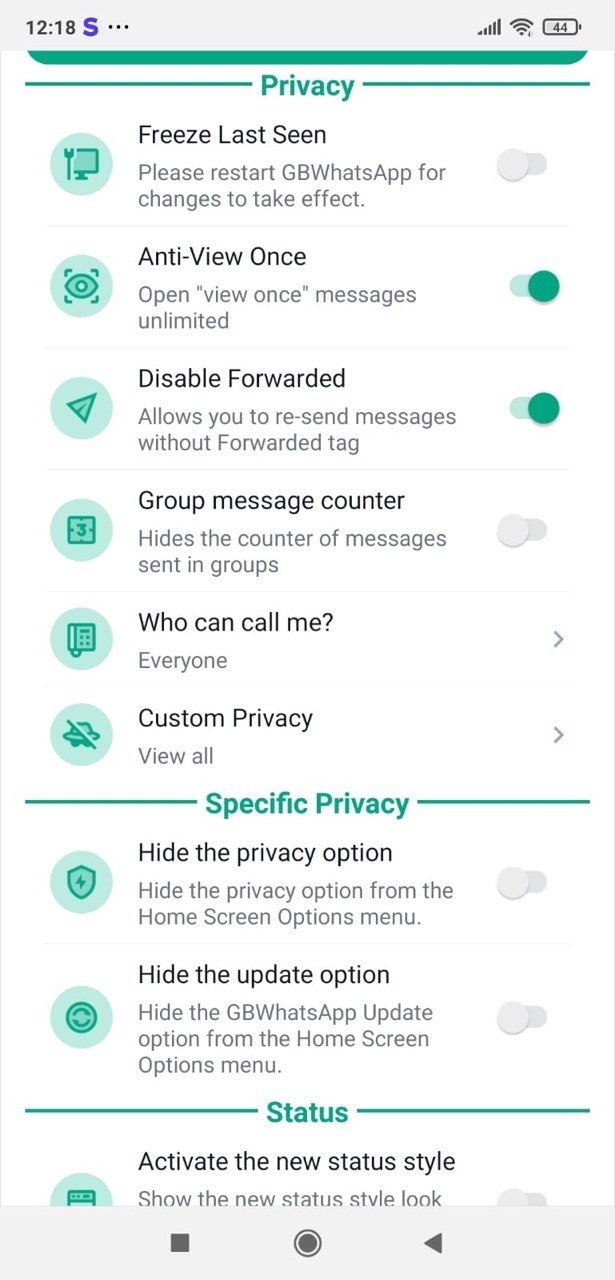
GB WhatsApp Pro lets you freeze your last seen to a specific time. Even when you actively use the app, contacts see your last seen as whatever moment you froze it on. This is more flexible than the official WhatsApp option that simply hides last seen for everyone — here you can show one to control how often you appear online.
Key benefits
- Choose any timestamp to display as your last seen
- Use the app freely without updating the timestamp
- Different from official WhatsApp — you stay visible but in the past
How to enable
Enable Freeze Last Seen in 3 steps
Total time: about 30 seconds. Requires GB WhatsApp Pro v18.80 to be installed first. If you have not installed yet, download from the homepage.
-
Open GB Settings → Privacy
Three-dot menu → GB Settings → Privacy.
-
Tap "Freeze Last Seen"
Toggle on. A time picker appears asking which timestamp to freeze to — default is the current time.
-
Pick a freeze time
Most users pick "now" so the timestamp will not change. Some pick "yesterday" so contacts see them as having been offline for a day.
FAQ
Questions about Freeze Last Seen
Can I still see other people's last seen?
Does the frozen time update automatically?
Common mistakes
What people get wrong with Freeze Last Seen
The most-asked support questions about Freeze Last Seen come from these three patterns. Worth scanning before you enable.
- 1
Freezing to a time in the future. Some Android timezone tricks can make the freeze pick up a wrong time. Verify by asking a friend what they see for your last seen.
- 2
Confusing Freeze Last Seen with Hide Last Seen. Freeze = always shows the same time. Hide = shows nothing at all.
More from Privacy
Related privacy features
Ghost Mode
Become completely invisible — others see no online status, typing or recording indicators, and no read receipts.
Hide Online Status
Stay invisible while chatting — nobody sees the "online" badge under your name.
Hide Blue Ticks
Read messages without sending the second blue tick — even after replying.
Useful next
More on Freeze Last Seen and related topics
Hand-picked guides on how this feature interacts with installation, anti-ban routing, and the rest of GB WhatsApp Pro.
- How-to
Install GB WhatsApp Pro on Android
Safe sideload sequence — enable Unknown Sources, verify SHA-256 hash, first-launch checks.
Read - How-to
Update without losing chats
Safe in-place update procedure from any older build. Backup, install over, verify the upgrade kept your data.
Read - Blog
Anti-Ban Guide 2026
What "anti-ban" actually means at the routing-layer level, which user behaviours actually raise ban risk, and what to do if a ban hits.
Read
Get Freeze Last Seen (and 24 more features)
Install GB WhatsApp Pro v18.80 from gbwhattspro.com — every feature unlocked from first launch.